Shipment Calendar View

Our customers asked, so we built it.
Users navigating their Shipment List can easily toggle between the Card, Condensed, and Calendar Views to get the shipment perspective they prefer. Calendar View is a monthly snapshot of booked shipments across all modes. Status options include: Scheduled, Picked Up, In Transit, Out for Delivery, or Delivered.
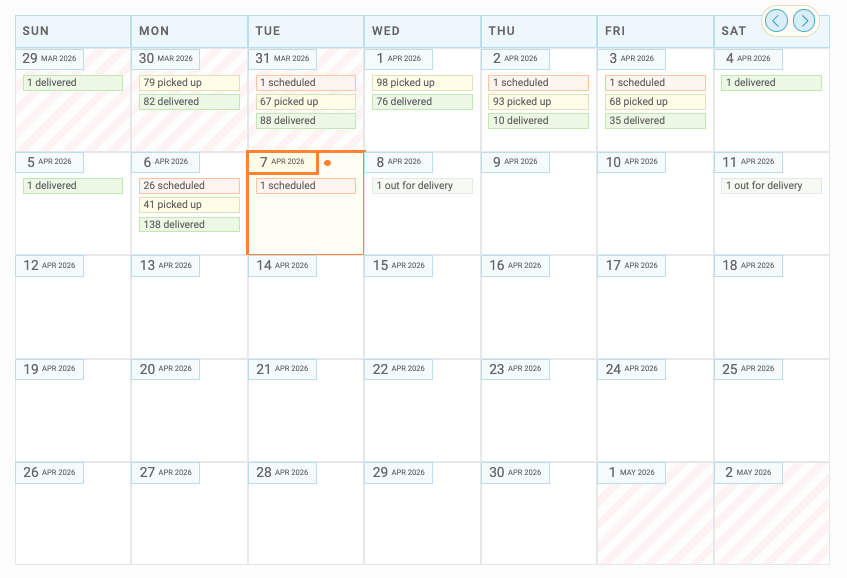
Select a date to open the slider and dig deeper.
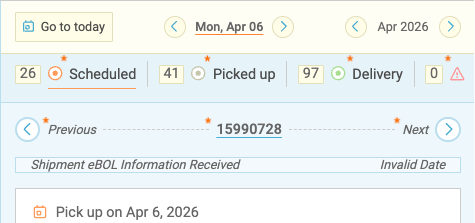
Drill into the details
Filter by:
- Scheduled
- Picked Up
- Delivery
- Exception
Shipment details at a glance:
- Pickup date
- BOL & PRO number
- Quoted rate
- Booked by
- ETA
Use < Previous & Next > to quickly move between shipments, or click the BOL number to view a list of all shipments for that day.
Select -> Full details to jump directly to the Shipment Details page.

Built for How You Ship
Multimodal Visibility: View all your FTL, LTL, Spot/Volume, and Parcel shipments in one place.
Real-time updates: Your calendar updates as shipments move throughout the day. A shipment marked as Scheduled may shift to In Transit, Out for Delivery, or Delivered as tracking updates come in.
- LTL and Parcel shipments update automatically via API.
- Truckload and Spot Volume shipments update based on carrier input via the Carrier Portal.
Custom filters: Want a more focused view? Apply your existing Custom Filters to narrow down what you see in Calendar View.
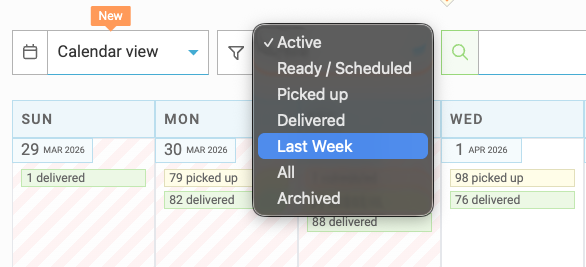
Calendar View gives you a clearer, more dynamic way to stay on top of your shipments—helping you plan ahead, track progress, and keep everything moving.
We hope you enjoy our latest feature! As always, if you have questions, feedback, or ideas for future enhancements, our Support Team would love to hear from you!